
How to Use AI for Beginners: A Real-World Guide Based on Actual Experience
How to Use AI for Beginners: A Real-World Guide Based on Actual Experience
I still remember the first time I tried using an AI chatbot back in early 2023. I typed “write me a blog post about coffee” and expected magic. What I got was… well, let’s just say it read like a high school essay written at 2 AM. I’ve come a long way since then, and if you’re just starting your AI journey in 2026, you’re actually in a much better position than I was three years ago. The tools have matured significantly, but more importantly, we now understand how to work with AI rather than expecting it to work for us.
Let me walk you through what I’ve learned from using AI daily—both the successes and the faceplants—so you can skip the frustrating trial-and-error phase I went through.
Understanding What AI Actually Is (And Isn’t)
Before we dive into the “how,” let’s clear up what we’re actually dealing with here.
When most people talk about “using AI” in 2026, they’re typically referring to generative AI—tools like ChatGPT, Claude, Gemini, and the countless specialized applications built on similar technology. These aren’t sentient beings or all-knowing oracles. Think of them more like incredibly well-read assistants who’ve consumed vast amounts of text, images, or other data and can recognize patterns to generate responses.
Here’s the thing that took me months to truly grasp: AI doesn’t “know” anything in the way you or I know things. It predicts what should come next based on patterns. Sometimes those predictions are remarkably insightful. Other times, they’re confidently wrong—a phenomenon we call “hallucination.”
I learned this the hard way when I asked an AI to summarize a specific scientific study. It gave me what looked like a perfect summary, complete with statistics. Except when I checked the actual paper, half those numbers were completely made up. The AI had essentially filled in what seemed like plausible data. That was a wake-up call.

Getting Started: Your First Steps with AI
Choose Your Starting Point
You don’t need to sign up for everything at once. In fact, I’d recommend against it. When I first started, I created accounts on five different platforms in one afternoon and ended up overwhelmed and using none of them effectively.
Start with one general-purpose AI assistant. As of 2026, the main players are:
- ChatGPT (OpenAI): Still the household name, now with significantly improved reasoning capabilities
- Claude (Anthropic): Known for longer context windows and nuanced conversation
- Gemini (Google): Deeply integrated with Google’s ecosystem
- Copilot (Microsoft): Embedded across Microsoft products
For most beginners, I suggest ChatGPT or Claude. They’re user-friendly, well-documented, and have free tiers that are genuinely useful. I primarily use Claude for writing work and ChatGPT for quick research tasks, but your mileage may vary.
Your First Conversation
Here’s where most beginners go wrong: they either ask questions that are too vague or treat the AI like a search engine.
Bad first attempt: “Tell me about marketing.”
Better approach: “I’m opening a small bakery in a suburban neighborhood. What are three low-cost marketing strategies I should prioritize in my first six months?”
See the difference? The second gives context, specifies what you need, and sets boundaries. I’ve found that AI responds dramatically better when you:
- Provide relevant background
- Specify the format you want (bullet points, paragraph, step-by-step)
- Define the scope (three strategies, not fifty)
- Mention your constraints (low-cost, in this case)

Practical Applications That Actually Work
Let me share some areas where I’ve found AI genuinely helpful, along with realistic expectations.
Writing and Editing
This is probably AI’s strongest suit right now. I use AI almost daily for:
-
Brainstorming: When I’m stuck on how to structure an article, I’ll describe my topic and ask for five different angle approaches. I rarely use the suggestions verbatim, but they unstick my brain.
-
First drafts: For routine emails or standard documents, AI can generate a solid starting point that I then personalize. This saves me from staring at a blank page.
-
Editing: I’ll paste in my writing and ask it to spot unclear sections or suggest tighter phrasing. It caught a paragraph in one of my pieces where I’d used “however” three times in four sentences. Sometimes you need that outside perspective.
Real example from last week: I needed to write a tricky email declining a project without burning bridges. I gave the AI context about my relationship with the client, my reasons for declining, and the tone I wanted (warm but firm). It gave me a draft that was about 70% there. I tweaked it to sound more like me, but it gave me the structure I was struggling with.
Research and Learning
AI has become my starting point for learning new topics, but never my ending point.
I was recently trying to understand blockchain technology for a project. Instead of diving into dense whitepapers, I had a conversation with Claude that went like this:
“Explain blockchain to me like I’m moderately tech-savvy but have no background in cryptography. Use a real-world analogy.”
The explanation I got—comparing it to a shared Google Doc that everyone can view but no one can delete or modify past entries—finally made it click. Then I asked follow-up questions about specific aspects I didn’t understand.
The key: I verified the main concepts through traditional sources afterward. AI is brilliant for making complex topics digestible, but you need to fact-check anything important.
Coding and Technical Tasks
Even if you’re not a programmer, AI has made certain technical tasks accessible to beginners.
I have zero formal coding training, but I’ve used ChatGPT to:
- Write simple Excel formulas that would’ve taken me an hour to figure out
- Create basic scripts to automate repetitive tasks
- Debug code snippets (with mixed success)
Last month, I needed to batch-rename about 300 files following a specific pattern. I described what I needed, and ChatGPT gave me a Python script with instructions on how to run it. Worked perfectly. Would I have even attempted this pre-AI? Absolutely not.
Creative Projects
Image generation tools like DALL-E, Midjourney, and Stable Diffusion have opened up creative possibilities that weren’t available to non-artists before.
I’ve used them to:
- Create placeholder images for presentations
- Generate concept art for projects
- Visualize ideas when explaining concepts to clients
But here’s the reality: getting good results requires practice and often many iterations. My first attempts at generating images were… let’s say “abstract.” I’d ask for “a professional office” and get something that looked like a fever dream.
The trick is being specific. “A modern, minimalist home office with a wooden desk, facing a window with natural light, a laptop open showing charts, indoor plants in the background, photorealistic style” gets you much closer to what you probably want.

The Art of Prompting (It’s Simpler Than It Sounds)
The term “prompt engineering” makes it sound more complicated than it is. Really, it’s just about being clear and conversational.
Here’s my simple framework that works for most situations:
1. Set the context: “I’m a small business owner with limited marketing budget…”
2. Specify your role or the AI’s role: “Acting as a marketing consultant…” or “You’re helping me prepare for a job interview…”
3. State your request clearly: “Create a 30-day social media content calendar focused on…”
4. Define constraints or preferences: “Keep it under 500 words,” “Use a professional but friendly tone,” “Include specific examples”
5. Iterate: Your first response might not be perfect. It’s fine to say, “Can you make this more concise?” or “This feels too formal—can you make it more conversational?”
I probably iterate 2-3 times on average for anything important. My first prompt is rarely my last.

Common Mistakes I Made (So You Don’t Have To)
Trusting Everything Blindly
I mentioned my scientific study mishap earlier. I’ve also had AI:
- Cite books that don’t exist
- Invent statistics
- Provide outdated information with complete confidence
- Mix up facts from similar but different topics
Always verify important information, especially dates, statistics, quotes, and technical specifications.
Expecting Perfection on the First Try
AI is a collaborator, not a magic wand. My best results always come from a back-and-forth conversation, refining and redirecting.
Using AI for Everything
Just because you can use AI for something doesn’t mean you should. I’ve tried using AI to:
- Plan my weekly meals (it gave me combinations nobody would actually eat)
- Write personal messages to friends (felt hollow and weird)
- Make decisions about subjective preferences (it can’t tell you what you like)
AI works best for tasks that benefit from pattern recognition, information synthesis, or generating options. It’s not great at genuine creativity, nuanced judgment calls, or anything requiring real-world sensory experience.
Forgetting Privacy
Don’t paste confidential information, personal data, or proprietary content into AI tools. Those conversations may be used for training or reviewed by humans. I’ve seen people paste client contracts, medical records, and unreleased product details into ChatGPT. Please don’t.
Building Your AI Skill Set Gradually
You don’t need to master everything at once. Here’s how I’d approach it if I were starting fresh in 2026:
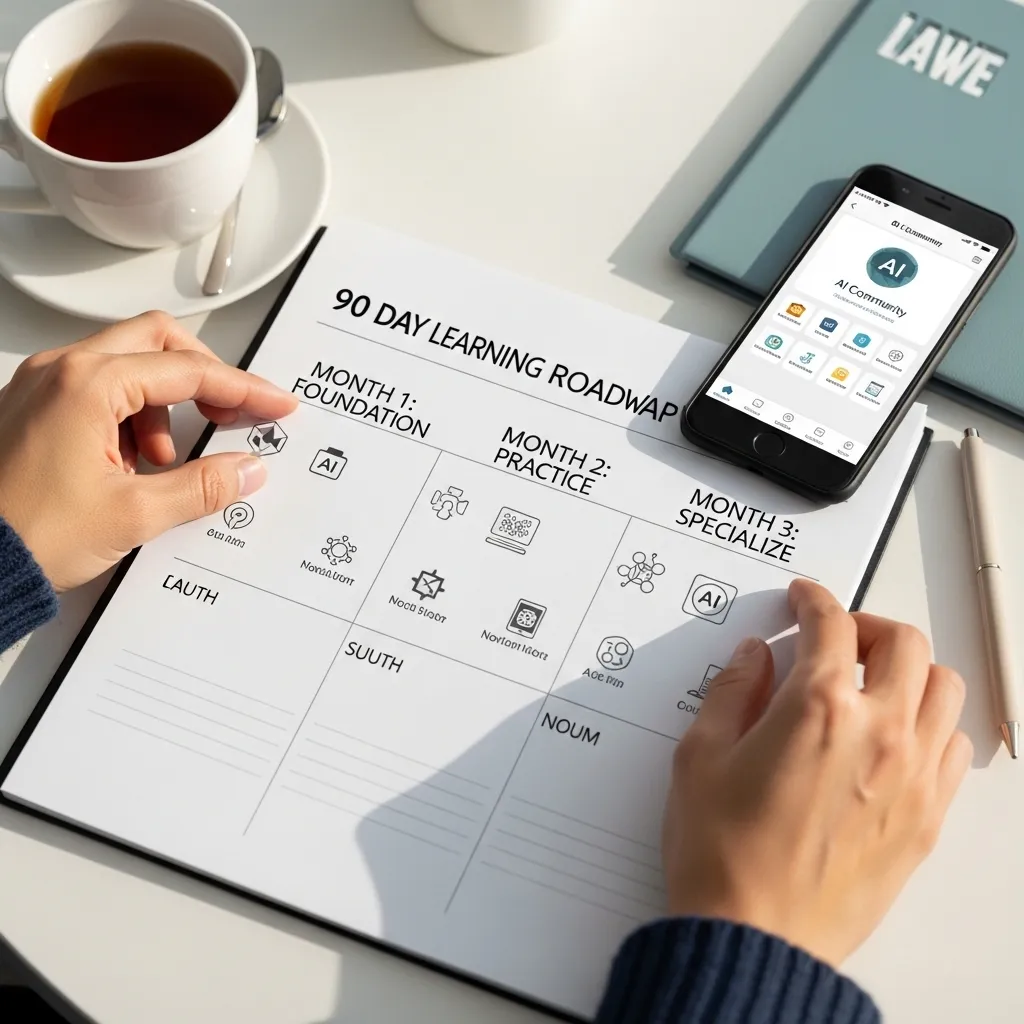
Week 1-2: Get comfortable with basic conversation. Ask questions, request explanations, use it like a knowledgeable friend who’s always available.
Week 3-4: Start using it for simple work tasks. Email drafts, research summaries, brainstorming sessions.
Month 2: Experiment with more structured prompts. Try getting it to adopt different perspectives or expertise levels.
Month 3: Explore specialized applications. If you work in a specific field, look for AI tools built for that domain. There are now specialized AIs for legal research, medical documentation, financial analysis, and dozens of other fields.
Ongoing: Join communities, follow updates, and experiment. The technology is still evolving rapidly. Features that didn’t exist when I started this article might be standard by the time you read it.
The Ethics and Limitations We Need to Talk About
I’d be doing you a disservice if I didn’t address this directly.
Attribution and Academic Integrity
If you’re a student, understand your institution’s policies. Many universities now have clear guidelines about AI use. Some allow it for brainstorming, others for editing, some prohibit it entirely for certain assignments.
In professional contexts, if AI significantly contributed to something you’re presenting as your work, consider how to handle attribution. This is still evolving, but transparency is usually the safer bet.
Bias and Representation
AI systems can perpetuate and amplify biases present in their training data. I’ve noticed this in:
- Image generation defaulting to certain demographics
- Career advice that reflects outdated gender stereotypes
- Examples that assume Western, English-speaking contexts
Being aware of this helps you catch and correct it. If you ask for “a picture of a CEO” and it only shows you men in suits, that tells you something about the training data bias.
Environmental Impact
Training and running large AI models consumes significant energy. This is getting better as the technology becomes more efficient, but it’s worth being mindful about. Do you need AI to tell you what 2+2 equals? Probably not.
Job Displacement Concerns
This is real, and I won’t sugarcoat it. AI is changing job markets. But historically, technology shifts create new roles while eliminating others. The people who thrive are those who learn to use the new tools effectively.
I see AI as something that handles routine cognitive tasks the way tractors handle routine physical labor. It doesn’t mean farmers disappeared—it means farming changed.

Where to Go From Here
The best way to learn AI is genuinely just to use it. Start small, stay curious, and don’t be afraid to experiment.
Some resources I’ve found valuable:
- YouTube channels: There are countless tutorials now, but look for ones that show real workflows, not just flashy demos
- Reddit communities: r/ChatGPT, r/ClaudeAI, and similar subreddits are full of people sharing prompts and use cases
- Twitter/X: Despite everything, it’s still where AI developers and power users share tips and updates
- Official documentation: OpenAI, Anthropic, and Google all have learning resources on their sites
The landscape in 2026 is dramatically different from even a year ago. We’ve seen improvements in reasoning capabilities, longer conversation memory, better integration with other tools, and more specialized applications.
But the fundamentals remain: AI is a tool. A powerful, sometimes frustrating, often impressive tool. It augments human capability but doesn’t replace human judgment, creativity, or ethical reasoning.
I use AI daily now, and it’s made me more productive in specific areas. But it’s also made me more aware of what makes human work valuable—the context, the judgment, the lived experience that no pattern-matching system can replicate.
Start experimenting today. Ask it a question you’re genuinely curious about. See what happens. Then iterate from there.
You’ll make mistakes. You’ll get weird responses. You’ll occasionally have those “wow, that’s incredible” moments. That’s all part of the learning curve.
The AI revolution isn’t coming—it’s already here. But it’s not the robot uprising some feared or the instant solution others promised. It’s just a new set of tools that we’re all figuring out together.

Frequently Asked Questions
1. Do I need to pay for AI tools to get value from them, or are free versions enough?
For most beginners, free versions are absolutely enough to start and even to accomplish serious work. I used ChatGPT’s free tier exclusively for my first four months and got tremendous value. The paid versions ($20-25/month typically) offer advantages like faster responses, priority access during peak times, and advanced features, but they’re not necessary for learning. My advice: start free, and upgrade only when you’re hitting specific limitations that frustrate your workflow. You’ll know when that point comes.
2. How do I know when AI is giving me wrong information?
This is the million-dollar question. Watch for red flags: overly confident statements about very specific facts, statistics without sources, or claims that seem surprising. For anything important—medical advice, financial decisions, legal matters, academic work—always verify through authoritative sources. I use a “trust but verify” approach: AI is my starting point for research, never my ending point. If something is consequential, I check it against at least two independent sources. Also, newer AI systems in 2026 are better about expressing uncertainty, so pay attention when they use qualifiers like “this might be” or “I’m not certain.”
3. What’s the difference between ChatGPT, Claude, and other AI assistants? Which should I choose?
Honestly, for beginners, the differences matter less than people think. It’s like asking whether to buy a Honda or Toyota—both will get you where you need to go. That said, I’ve noticed ChatGPT tends to be more conversational and creative, Claude handles longer documents better and tends toward more nuanced responses, and Gemini integrates smoothly with Google Workspace. My genuine recommendation: try the free version of two or three and see which interface and conversation style feels most natural to you. You can always use multiple tools for different purposes. I do.
4. Can my employer see what I’m doing with AI tools, and should I be concerned about privacy?
If you’re using AI through your work computer or work accounts, assume your employer can see it. Many companies now have policies about AI usage, and some use enterprise versions that give them oversight. For personal AI use, the main privacy consideration is that conversations may be reviewed by humans for quality control and used for training (though most services now let you opt out). The golden rule: never input confidential information, personal identifying details, proprietary data, or anything you wouldn’t want potentially seen by others. I treat AI conversations like I’m in a coffee shop where others might overhear—I keep it professional but not confidential.
5. I’m worried about becoming too dependent on AI and losing my own skills. Is this a valid concern?
Yes, it’s valid, and I think about this too. The key is being intentional about how you use AI. I use it to handle routine tasks or to augment my thinking, not to replace it. For example, I’ll use AI to generate a first draft outline, but I do the actual analysis and synthesis myself. Or I’ll ask it to check my code for errors, but I make sure I understand what the code does. Think of it like using a calculator—you still need to understand math, but you don’t need to manually compute large numbers. The people who get in trouble are those who outsource their thinking entirely. Use AI as a collaborator, not a replacement for developing your own expertise. I actually find AI helps me learn faster because I can ask “why” questions and explore topics more deeply than I could alone.






