
Best AI Content Creation Tools: A Comprehensive Guide for 2026
Best AI Content Creation Tools: A Comprehensive Guide for 2026
I’ve been creating content professionally for over a decade, and I remember the exact moment I realized AI tools had crossed from “interesting experiment” to “actually useful.” It was early 2024, and I was staring down a deadline for ten blog posts while also managing three client projects. Normally this would mean a weekend of stress and rushed work. Instead, I finished everything by Thursday afternoon with better quality than I typically produced under pressure.
That wasn’t magic—it was learning to use AI content creation tools strategically. Not as replacements for thinking or writing, but as collaborators that handled the tedious parts while I focused on strategy, expertise, and the human elements that actually matter.
Since then, I’ve tested probably 50+ AI content tools across writing, design, video, and audio. I’ve watched some disappear, others evolve dramatically, and a few genuinely transform how content creators work. I’ve also seen plenty of overhyped tools that promise miracles and deliver mediocrity.
This guide is everything I’ve learned about what actually works in 2026—which tools are worth your time, how to use them effectively, and just as importantly, their limitations and when not to use them.
The 2026 Content Creation Landscape
The AI content tools market has matured significantly from the wild west days of 2022-2023. Back then, you had ChatGPT and a handful of experimental tools. Now the space has consolidated around genuinely capable platforms while continuing to spawn specialized tools for specific content types.
A few major shifts have defined 2026:
Quality has improved dramatically. The generic, obviously-AI-written content that plagued early tools is less common. Modern tools produce drafts that require editing, not complete rewrites.
Multimodal has become standard. Most tools now handle text, images, and increasingly video in integrated workflows. You’re not jumping between completely separate tools for different content types.
Detection has gotten sophisticated. AI detection tools have improved, and search engines have become better at identifying low-effort AI content. This has forced a shift from “generate and publish” to “AI-assisted creation with human expertise.”
Ethical standards have emerged. The industry has developed (somewhat) clearer norms around disclosure, attribution, and responsible use. Companies using AI tools are more transparent about it.
Specialization has accelerated. Instead of one tool trying to do everything, we’re seeing tools optimized for specific content types, industries, or platforms.
The result? AI content creation is now a legitimate part of professional workflows, but with more sophisticated understanding of how to use these tools responsibly and effectively.

Best AI Writing and Text Content Tools
Writing tools are where most creators start, and for good reason—text content still dominates most marketing and communication strategies.
ChatGPT Plus / GPT-4: The Versatile Foundation
I maintain a ChatGPT Plus subscription and use it almost daily, though not in the ways most people assume.
What I actually use it for:
Brainstorming and ideation. When I’m stuck on how to approach a topic, I’ll describe what I’m working on and ask for angle suggestions, potential structures, or perspectives I haven’t considered. Last week I was writing about a complex technical topic. ChatGPT suggested framing it through three different user personas, which became the article structure.
Research assistance and simplification. I use it to quickly understand unfamiliar topics before diving into proper research. It’s like having a really well-read colleague who can explain things clearly. I then verify important claims and dive deeper into primary sources.
First draft generation (with caveats). For certain content types—product descriptions, social media variations, routine email newsletters—I’ll have ChatGPT generate drafts that I heavily edit. For thought leadership or anything requiring genuine expertise, I write it myself and maybe use ChatGPT for editing suggestions.
Editing and improvement. I paste drafts and ask for feedback on structure, clarity, or whether I’m explaining complex concepts clearly. This has genuinely improved my writing.
Real example: I recently needed to create product descriptions for 50 similar items. Writing them from scratch would have taken days and been mind-numbing. ChatGPT generated drafts for all 50 in about an hour. I spent another three hours editing for accuracy, brand voice, and differentiation. Total time: 4 hours instead of probably 12-15.
Pricing: ChatGPT Plus at $20/month. Worth it if you create content regularly.
Critical limitations:
- Can confidently present false information
- Lacks true expertise or original insight
- Tends toward generic phrasing without careful prompting
- No built-in fact-checking or source verification
- Prone to repetitive patterns if you’re not careful
Best practices I’ve learned:
- Always fact-check claims, especially statistics or specific details
- Provide extensive context in your prompts
- Edit heavily—never publish AI output verbatim
- Use it for structure and drafts, add your expertise and voice
- Ask for multiple variations to avoid generic first responses
Claude Pro: For Long-Form and Complex Content
I subscribe to both ChatGPT and Claude because they have different strengths. Claude excels at longer, more complex content work.
Where Claude shines:
Long-form content. Claude handles extended context better than ChatGPT in my experience. I can upload entire documents, transcripts, or research materials and work with them in-depth.
Analysis and synthesis. When I need to analyze multiple sources, identify themes, or synthesize complex information, Claude’s thoroughness helps. I recently uploaded five industry reports and asked Claude to identify common trends and contradictions. It gave me a comprehensive analysis that became the foundation for an article.
Detailed explanations. Claude tends to provide more thorough explanations with better nuance. For complex topics that require careful explanation, I often prefer Claude’s approach.
Document transformation. Taking content from one format to another—interview transcript to article, presentation to blog post, notes to report—Claude handles well.
Real example: I had a 90-minute interview transcript I needed to turn into a 2,000-word feature article. Claude helped me identify the most compelling quotes, suggested narrative structure, and created a rough draft I could work from. What typically takes me 4-5 hours took about 2.5.
Pricing: Claude Pro at $20-22/month.
When I choose Claude over ChatGPT:
- Working with long documents
- Need for detailed, nuanced analysis
- Prefer more formal, thoughtful tone
- Want to see reasoning process more explicitly
Limitations:
- Can be overly verbose
- Sometimes too cautious or hedging
- Monthly message limits on Pro tier
- Occasional slowness compared to ChatGPT
Jasper: Marketing-Focused Content Generation
Jasper was one of the first dedicated AI writing tools for marketing and has continued to evolve. It’s specifically designed for marketing content with templates, brand voice features, and workflow tools.
What makes it different:
Templates for specific content types. Instead of a blank prompt, Jasper offers structured templates for blog posts, ad copy, social media, product descriptions, emails, and more. You fill in key information, and it generates content following proven marketing frameworks.
Brand voice consistency. You can train Jasper on your brand’s tone and style, and it maintains that voice across different content types. A marketing team I consult with swears by this feature for maintaining consistency across multiple writers.
SEO features. Integration with Surfer SEO for keyword optimization and content scoring. Useful if SEO is a priority.
Team collaboration. Better team features than ChatGPT for agencies or in-house teams creating lots of content.
Real application: A B2B SaaS company I know uses Jasper for their blog content. Their process: Subject matter expert provides outline and key points → Jasper generates draft → Content editor refines for voice and accuracy → SME reviews for technical correctness. They’ve gone from publishing 4 blog posts monthly to 12-15 with the same team size.
Pricing: Creator plan at $49/month; Teams at $125/month; custom Business pricing.
When Jasper makes sense:
- You create large volumes of marketing content
- You have multiple people creating content who need consistency
- SEO optimization is important
- You want more structure than ChatGPT provides
When it doesn’t:
- You create content occasionally
- You need a general-purpose writing tool
- Budget is constrained (ChatGPT Plus does a lot for $20/month)
Copy.ai: Affordable Marketing Content
Copy.ai offers similar marketing-focused features to Jasper at a lower price point.
Key features:
- Marketing copy templates
- Social media content generation
- Email sequences
- Product descriptions
- Blog post outlines and drafts
Who uses it: Small businesses and solo creators who need marketing content tools but can’t justify Jasper’s pricing.
A solo entrepreneur I know uses Copy.ai for all her social media content, email newsletters, and ad copy. She spends maybe 2-3 hours weekly creating content that maintains decent quality and consistency.
Pricing: Free tier available; Pro at $36/month; Team at higher tiers.
Trade-offs: Less sophisticated than Jasper, but for the price difference, many users find the quality acceptable for their needs.
Writesonic: AI Writing with Built-in SEO
Writesonic has positioned itself between general tools like ChatGPT and marketing-specific tools like Jasper.
Distinctive features:
- AI article writer optimized for SEO
- Fact-checked content with citations (relatively new feature)
- Chrome extension for writing anywhere
- Bulk content generation
The fact-checking feature is interesting—Writesonic attempts to verify claims and provide sources. It’s not perfect, but it’s a step toward addressing the accuracy problem.
Pricing: Free tier; Unlimited plan at $16-20/month.
Best for: Bloggers and content marketers who prioritize SEO and want a middle ground between ChatGPT and Jasper.
Notion AI: Content Within Your Workspace
If you already use Notion for content planning, notes, or knowledge management, Notion AI is worth considering.
Advantages:
- Works directly in your existing workspace
- No context switching
- Can work with your existing notes and research
- Good for transforming notes into drafts
I use Notion for content planning and research organization. Notion AI lets me turn messy research notes into structured article outlines, generate social media versions of articles, or create summaries—all without leaving my workspace.
Pricing: $8-10/month add-on to Notion subscriptions.
Limitation: Only valuable if you’re already in the Notion ecosystem.
Best AI Image Creation and Design Tools
Visual content has become non-negotiable for most content strategies. AI tools have made professional-looking visuals accessible to non-designers.
Midjourney: High-Quality Image Generation
Midjourney remains the gold standard for AI image generation quality in 2026.
What I use it for:
Blog and article headers. I generate custom images that actually relate to article topics rather than using generic stock photos. The difference in engagement is noticeable.
Social media visuals. Creating eye-catching images for social posts, particularly for conceptual or abstract topics where stock photos feel forced.
Presentation graphics. When I need a specific visual for a presentation that doesn’t exist in stock libraries.
Concept visualization. Showing clients or stakeholders visual concepts quickly.
Real example: I needed an image representing “AI and human collaboration in creative work” for an article. Stock photos of this concept are terrible—staged, obvious, cliché. I generated several options in Midjourney showing actual creative collaboration between humans and AI in interesting visual styles. Found one that perfectly captured the concept in about 20 minutes.
Pricing: Basic at $10/month; Standard at $30/month (required for commercial use); Pro at $60/month.
Learning curve: Writing effective prompts takes practice. Expect a learning period of a few weeks to consistently get good results. The Midjourney community and prompt guides help significantly.
Important considerations:
- Copyright and usage rights remain complex for AI-generated images
- Standard plan minimum for commercial use
- Can’t generate specific real people reliably
- Text in images is often garbled
- Certain styles and concepts work better than others
Prompt tips from experience:
- Be specific about style, composition, lighting, mood
- Reference art styles, artists, or movements
- Include aspect ratio and quality parameters
- Use negative prompts to exclude unwanted elements
- Generate multiple variations to find the best option
DALL-E 3 (via ChatGPT Plus): Integrated Image Generation
DALL-E 3 is accessible through ChatGPT Plus, making it convenient if you’re already using ChatGPT for text content.
Advantages over Midjourney:
- Integrated with text generation (create images while writing)
- Better at understanding natural language descriptions
- More accurate with text in images
- No separate subscription needed if you have ChatGPT Plus
Where I use it:
- Quick images needed during writing workflow
- Infographic elements
- Diagrams and explanatory visuals
- When I need something specific but simple
Quality comparison: Midjourney generally produces more aesthetically impressive images, but DALL-E 3 is more reliable for specific requests and much better with text.
Example use: Creating simple infographic components or diagrams to illustrate concepts. DALL-E 3 handles these straightforward requests well without the prompt engineering Midjourney sometimes requires.
Adobe Firefly: Commercial-Safe AI Images
Adobe’s AI image generator is trained on licensed content, making it safer for commercial use from a copyright perspective.
Why it matters: The legal status of AI-generated images remains murky. Firefly’s training on licensed content (Adobe Stock, public domain, expired copyright) provides more confidence for commercial applications.
Integration advantage: If you use Adobe Creative Cloud, Firefly integrates directly into Photoshop, Illustrator, and Express. You can generate and edit images in your existing workflow.
Features I use:
- Generative fill in Photoshop (extend images, remove objects, add elements)
- Text-to-image generation
- Text effects
- Background generation
A designer friend uses Firefly extensively for client work specifically because of the licensing clarity. For agencies and businesses concerned about legal risk, this matters.
Pricing: Included with Creative Cloud subscriptions; standalone tiers available.
Trade-off: Image quality and creative range aren’t quite at Midjourney’s level, but the commercial licensing confidence and Adobe integration make it valuable for different use cases.
Canva AI: Design for Non-Designers
Canva was already the leading design tool for non-designers. The AI features have made it even more powerful for content creators.
AI features I actually use:
Magic Design: Describe what you need, get complete design layouts. “Instagram carousel about content marketing tips” generates multiple design options I can customize.
Background Remover: Instantly remove backgrounds from photos. This alone saves significant time.
Magic Edit: Select and modify parts of images with AI.
Text to Image: Generate custom images directly in Canva.
Smart Resize: Automatically resize designs for different platforms.
Real workflow: Creating social media content for multiple platforms. I design once in Canva, use AI features to adapt the core message to different sizes and formats (Instagram post, story, LinkedIn banner, Twitter header), and have platform-optimized content in a fraction of the time manual resizing took.
A small business owner I know runs all her visual content through Canva. She has zero design background but produces professional-looking materials for social media, marketing, and presentations.
Pricing: Free tier is functional; Canva Pro at $13-15/month unlocks most AI features.
Best for: Non-designers who need to create visual content regularly. If you’re a professional designer, you’ll likely find it limiting.

Best AI Video Creation Tools
Video content continues growing in importance, and AI tools have made video creation accessible to creators who aren’t video editors.
Descript: Video Editing by Editing Text
Descript has fundamentally changed how I approach video content.
The concept: Upload video, Descript transcribes it, you edit the video by editing the transcript. Delete a sentence in the text, that section disappears from the video. It sounds simple but it’s transformative if you’re not a trained video editor.
Features I depend on:
Filler word removal: Automatically removes “um,” “uh,” “like,” and other filler words. This alone is worth the subscription.
Overdub: Record yourself saying something wrong? Type the correct words, and Descript generates audio in your voice. This is genuinely impressive and saves huge amounts of time versus re-recording.
Studio Sound: AI-powered audio enhancement that makes home recordings sound much more professional.
Automatic captioning: Generates accurate captions with minimal editing needed.
Real application: I create video content for a blog and YouTube. My process: Record talking head video, upload to Descript, remove filler words, cut unnecessary sections by deleting transcript text, correct mistakes with Overdub, enhance audio, add captions, export. What would take hours in traditional editing software takes maybe 30-45 minutes.
Pricing: Free tier with limitations; Creator at $24/month; Pro at $40/month.
Learning curve: Minimal. If you can edit a Google Doc, you can edit video in Descript.
Limitations:
- Works best for talking-head content and interviews
- Less suitable for complex visual editing
- Overdub quality depends on having enough sample audio
- Occasional transcription errors need manual correction
Runway ML: AI Video Effects and Generation
Runway has positioned itself as the creative AI platform for video, offering effects and capabilities that were recently impossible or required expensive software and expertise.
Key features:
Background removal: Green screen effects without a green screen.
Frame interpolation: Convert 24fps to 60fps smoothly.
Motion tracking: Track objects and add effects.
Text/image to video: Generate video clips from descriptions (experimental but improving).
Video inpainting: Remove objects from video.
Color grading: AI-powered color correction and grading.
I’ve used Runway primarily for background removal (creating professional-looking talking head videos without elaborate setups) and frame interpolation (making footage smoother).
A video creator I know uses the text-to-video features to generate B-roll footage that would be impractical to shoot. The quality isn’t photorealistic, but for abstract concepts or surreal elements, it works.
Pricing: Free tier with credits; Standard at $15/month; Pro at $35/month; Unlimited at $95/month.
Best for: Video creators who want professional effects without professional editing skills or expensive software.
Pictory: AI Video Creation from Text
Pictory creates videos from text content—blog posts, articles, scripts—automatically selecting relevant stock footage, adding captions, and generating complete videos.
How it works: Paste an article or script, Pictory analyzes it, finds relevant stock video clips and images, adds text overlays, includes background music, and outputs a video.
Use case: Repurposing written content into video for social media, YouTube, or websites.
A content marketing team I consult with uses Pictory to create video versions of their blog posts. They publish the text article and simultaneously create a video summary for YouTube and social platforms. This has significantly expanded their content distribution.
Pricing: Standard at $23/month; Premium at $47/month.
Quality expectations: These videos are obviously template-based, but for certain contexts—social media, quick informational videos, content repurposing—they’re entirely acceptable.
Limitations:
- Generic aesthetic
- Limited creative control
- Dependent on stock footage library
- Not suitable for premium or highly branded content
OpusClip: AI Short-Form Video Creation
OpusClip specializes in one thing: turning long-form video into short clips optimized for TikTok, Instagram Reels, YouTube Shorts, etc.
What it does: Upload a long video (podcast, webinar, presentation), OpusClip analyzes it, identifies compelling segments, cuts them into short clips, adds captions, and formats them for various platforms.
Why this matters: Short-form video is crucial for discoverability and engagement, but creating clips manually is time-consuming.
I tested OpusClip with a 45-minute webinar. It identified 12 potential clips, ranked by “viral potential,” and formatted them all with captions and optimized framing. I reviewed them, selected the 5 best, made minor edits, and had a week’s worth of social content in about an hour total.
Pricing: Free tier with watermarks; Starter at $19/month; Professional at $79/month for heavy use.
Best for: Anyone creating long-form video content who wants to maximize it across short-form platforms without hiring a video editor.
Limitation: The AI doesn’t always identify the “best” moments correctly. You need to review suggestions rather than blindly publishing everything it generates.
Synthesia: AI Avatar Videos
Synthesia creates videos using AI avatars that speak your script. You write text, choose an avatar, and it generates a video of the avatar speaking your words.
Legitimate use cases:
- Training videos at scale
- Multilingual content (same video in multiple languages)
- Quick explainer videos
- Internal communications
Where I’ve seen it work well: A large company using it for employee training videos. They can update content by changing text rather than re-filming entire videos. They’ve also created the same training in 15 languages without hiring translators and actors for each.
Pricing: Starts around $30/month for basic; custom pricing for enterprise.
Ethical consideration: The synthetic nature should be disclosed. Using AI avatars to impersonate real people or deceive audiences is problematic.
Limitation: The uncanny valley is real. These avatars are impressive technically but not quite human. For certain content this doesn’t matter; for anything requiring genuine human connection, it falls short.
Best AI Audio and Podcast Tools
Audio content, particularly podcasts, has grown enormously. AI tools are making production more accessible.
Descript (Again): Audio Editing
Descript’s text-based editing works just as well for audio-only content as for video.
I produce a podcast and do all editing in Descript. The workflow: Record conversation, upload to Descript, edit transcript to remove mistakes/tangents/filler words, enhance audio with Studio Sound, add intro/outro music, export.
This is dramatically faster and more intuitive than traditional audio editing in tools like Audacity or Adobe Audition.
Adobe Podcast AI: Audio Enhancement
Adobe Podcast (formerly Project Shasta) uses AI to enhance audio quality, removing background noise, echo, and room ambiance to make home recordings sound studio-quality.
Real result: I recorded an interview in a noisy coffee shop that I thought would be unusable. Adobe Podcast AI removed the background noise so completely that it sounded like a quiet studio recording. Not perfect, but usable.
Pricing: Currently free (as of 2026), though this may change.
Application: Salvaging imperfect recordings or improving home recording setup quality without expensive equipment.
Eleven Labs: AI Voice Generation
Eleven Labs creates realistic AI-generated voices for various applications.
Use cases:
- Voiceovers for videos
- Audiobook narration
- Podcast-style content without recording
- Multilingual content
The voice quality is remarkably good—often indistinguishable from human narration for listeners who aren’t listening critically.
Ethical considerations:
- Disclosure is important
- Don’t use it to impersonate specific people without permission
- Consider whether your content genuinely benefits from AI voice vs. human narration
Pricing: Free tier available; paid plans from $5-330/month depending on usage.
Limitation: While technically impressive, AI voices lack the emotional nuance and authentic personality that skilled human narration provides.

Social Media AI Content Tools
Social media demands constant content creation. AI tools can maintain consistency without burning out creators.
Buffer AI Assistant: Social Media Content and Scheduling
Buffer has integrated AI into their social media management platform for content generation and optimization.
Features:
- Generate post ideas based on topics
- Create post variations for different platforms
- Optimize posting times with AI analysis
- Repurpose long-form content into social posts
I use Buffer’s AI assistant primarily for repurposing blog content. I paste an article, it generates social media posts highlighting different angles, and I schedule them across platforms. Saves probably 2-3 hours weekly.
Pricing: Free tier available; Essentials at $6/month per channel; Team and Agency plans at higher tiers with more AI features.
Predis.ai: AI-Powered Social Media Creation
Predis specializes in creating complete social media posts—image, caption, and hashtags—from simple inputs.
How it works: Describe your product/service/topic, Predis generates complete posts with custom images, engaging captions, and relevant hashtags for multiple platforms.
A small e-commerce brand I know uses Predis for their Instagram and Facebook content. They provide product information and basic direction, Predis generates posts, they review and schedule. They’ve maintained consistent posting without hiring a social media manager.
Pricing: Free tier; Lite at $29/month; Premium at $59/month.
Quality: Generated content requires editing to avoid generic-sounding captions, but as starting points, it’s valuable.
ChatGPT/Claude for Social Content
Don’t overlook the general AI tools for social media content. I often use ChatGPT for:
- Generating multiple caption variations
- Adapting content for different platform audiences
- Creating content calendars
- Ideating campaign concepts
Example prompt: “I published this blog post about [topic]. Generate 10 different social media posts highlighting different angles from the article. Vary the tone from educational to conversational to provocative. Include hashtag suggestions for each.”
This generates diverse content I can select from and edit, rather than creating each post from scratch.
Choosing the Right AI Content Tools: Decision Framework
With dozens of AI content tools available, how do you actually choose? Here’s the framework I use:
Start with Your Content Types
What content do you actually create regularly?
- Primarily text (blogs, articles) → ChatGPT/Claude, possibly Jasper
- Marketing copy at scale → Jasper, Copy.ai, or Writesonic
- Visual social content → Canva AI
- Video content → Descript, Runway, or Pictory
- Multiple content types → Start with versatile tools, add specialized tools as needed
Consider Your Skill Level
Beginners: Tools with templates and structure (Jasper, Canva, Pictory)
Intermediate: Versatile tools you can learn to use effectively (ChatGPT, Midjourney, Descript)
Advanced: More powerful but complex tools (Runway, Adobe Firefly integration)
Evaluate Integration Needs
Which tools play nicely with your existing workflow?
- If you’re in Microsoft ecosystem → Copilot integration matters
- If you use Notion → Notion AI makes sense
- If you’re on Adobe Creative Cloud → Firefly integration is valuable
- If you use Buffer/Hootsuite → Their AI features might suffice for social content
Calculate Actual ROI
Don’t subscribe to tools you’ll use monthly. Calculate time savings:
- How much time does the tool actually save you weekly?
- What’s your hourly rate or value of that time?
- Does the time savings justify the cost?
I subscribe to ChatGPT Plus ($20/month) and Midjourney ($30/month) because I use them almost daily and they save me 8-10 hours weekly minimum. That’s easily worthwhile.
I cancelled Jasper because I wasn’t using it enough to justify $49/month. ChatGPT handled my needs adequately.
Start Small, Expand Intentionally
Begin with 1-2 tools that address your biggest needs. Master them. Then add others if you have specific use cases.
Subscription bloat is real. I’ve seen creators spending $200+/month on AI tools they barely use.
Content Quality: The Human Element
Here’s what I’ve learned after two years of using AI content tools intensively: the quality ceiling for AI-generated content isn’t the AI’s capability—it’s your expertise, judgment, and editorial standards.
AI tools are excellent at:
- Generating first drafts
- Handling routine, formulaic content
- Providing structure and frameworks
- Overcoming blank page syndrome
- Creating variations at scale
- Handling tedious formatting and repetitive tasks
AI tools are poor at:
- Original insight or genuine expertise
- Understanding nuanced context
- Emotional intelligence and authenticity
- Strategic thinking
- Fact-checking themselves
- Understanding your specific audience deeply
The quality equation: AI Draft + Human Expertise + Rigorous Editing = Quality Content
What doesn’t work: AI Generation → Minimal Review → Publish
I can usually identify AI-generated content that hasn’t been properly edited. It has tells:
- Generic phrasing and clichés
- Lack of specific examples or genuine insight
- Overly formal or stilted tone
- Superficial treatment of complex topics
- Repetitive structure across multiple pieces
- Absence of personality or distinctive voice
The content that works: AI helps with structure, drafts, and efficiency, but human expertise, editing, and strategic thinking make it actually good.
Ethical Considerations for AI Content Creation
Using AI content tools raises legitimate ethical questions that deserve serious consideration.
Disclosure and Transparency
Should you disclose AI use in content creation? This is contextual and evolving, but here’s my approach:
Generally should disclose:
- Fully AI-generated content with minimal human input
- Content where creation method matters to audience trust
- Commercial content in regulated industries
- When specifically asked
- Academic or journalistic content
Generally don’t need to disclose:
- AI assistance for editing, research, or ideation
- AI as one tool in a larger creation process with significant human input
- When the content is heavily edited and reflects genuine human expertise
- Technical uses (image background removal, audio enhancement, etc.)
The transparency test: If audiences knew you used AI, would they feel deceived? If yes, you should probably disclose.
I include general disclosure on my website that I use AI tools as part of my content creation process, but I don’t specifically tag every piece mentioning which tools I used.
Originality and Plagiarism
AI tools are trained on existing content, raising questions about originality.
My guidelines:
- AI-generated content is a starting point, not the final product
- Always add substantial original insight, expertise, and perspective
- Never publish AI output without significant editing and verification
- Don’t use AI to paraphrase or rewrite others’ specific ideas without attribution
- Fact-check and cite sources for factual claims
The value test: Is the final content valuable because of the AI generation, or because of your expertise, perspective, and strategic decisions? It should be the latter.
Quality Standards
There’s a temptation to prioritize volume over quality when AI makes content creation faster. Resist this.
Search engines are getting better at identifying low-quality AI content. Audiences can often tell when content lacks genuine insight. The short-term traffic gains from publishing massive volumes of mediocre AI content don’t seem to sustain.
Better approach: Use AI to create higher quality content more efficiently, not to create more low-quality content.
Environmental Considerations
AI models consume significant computational resources and energy. This matters.
I don’t have a perfect answer here, but I think about it. Using AI to generate 100 variations of ad copy to test one might not be the best use. Using it to significantly improve efficiency on genuinely valuable content seems more justified.
Attribution and Copyright
The legal status of AI-generated content remains murky, particularly for images.
Current best practices:
- Understand the terms of service for tools you use
- For commercial applications, use tools with clear licensing (Adobe Firefly, stock libraries)
- Don’t use AI to generate content that copies specific artists’ styles without consideration
- Stay informed on evolving legal standards
Practical Workflows: How to Actually Use These Tools
Theory is great, but here’s how I actually use AI content tools in daily workflows:
Blog Article Workflow
- Research and outline (myself, with Perplexity for unfamiliar topics)
- Generate initial draft (ChatGPT or Claude with detailed prompt including outline, key points, target audience)
- Heavy editing (this is where most time goes—adding expertise, specific examples, personality, verifying facts)
- Image creation (Midjourney for header, Canva for any embedded graphics)
- SEO optimization (Grammarly and manual review)
- Social media adaptation (ChatGPT to generate multiple post variations, Canva for visual versions)
Time comparison:
- Pre-AI: 6-8 hours for a comprehensive article
- With AI: 3-4 hours for same quality
Social Media Content Workflow
- Content calendar planning (ChatGPT for ideas and dates)
- Visual creation (Canva AI for designs, or Midjourney for custom images)
- Caption writing (ChatGPT for variations, heavy editing for brand voice)
- Scheduling (Buffer with AI post optimization)
Time comparison:
- Pre-AI: 5-6 hours weekly for consistent multi-platform posting
- With AI: 1.5-2 hours weekly
Video Content Workflow
- Script outline (ChatGPT for structure)
- Recording (myself)
- Editing (Descript for transcript-based editing, filler removal, corrections)
- Enhancement (Descript Studio Sound, color correction)
- Repurposing (OpusClip for short-form versions)
- Distribution (standard upload process)
Time comparison:
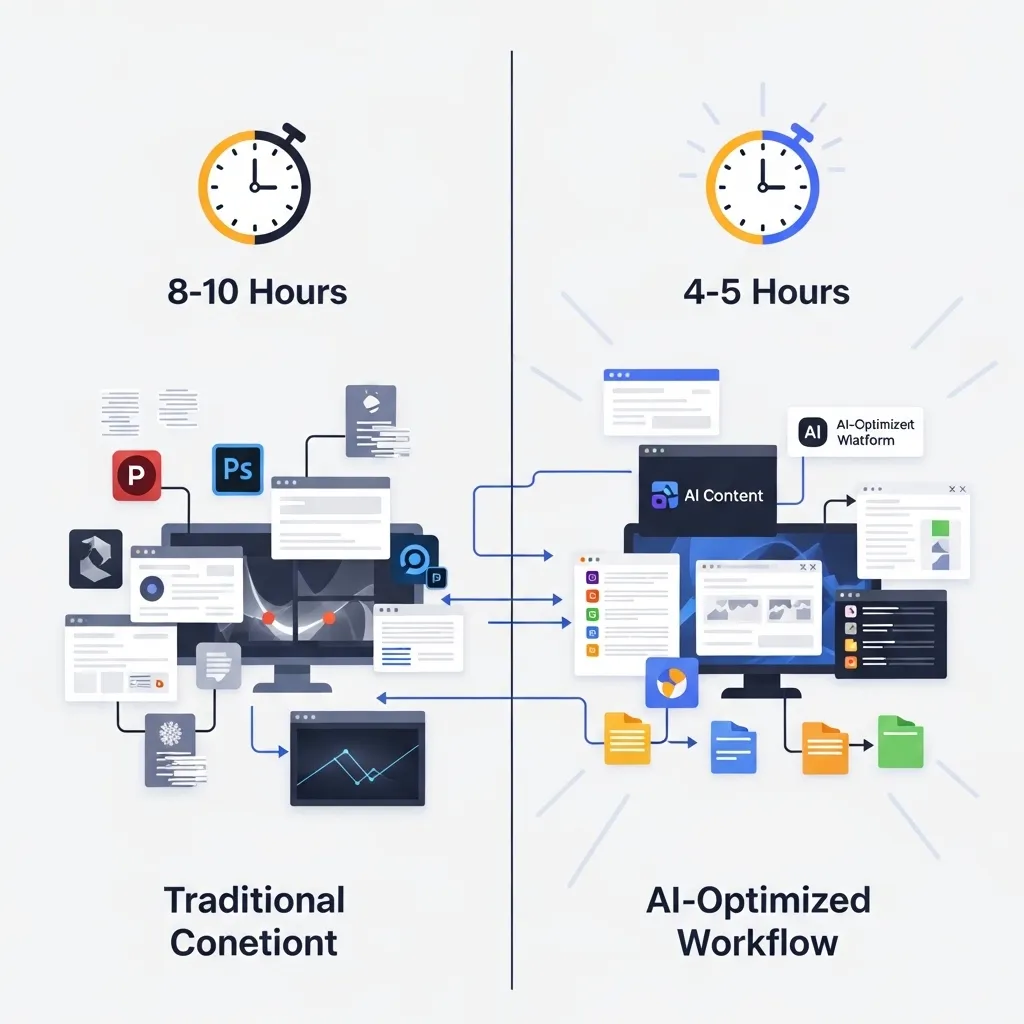
- Pre-AI: 8-10 hours for one long-form video plus clips
- With AI: 4-5 hours for same output
Email Newsletter Workflow
- Content selection (what to include)
- Writing (first draft from ChatGPT, heavy editing)
- Design (Canva for any visual elements)
- Editing and personalization (significant human time here)
- Send (standard email platform)
Time comparison:
- Pre-AI: 2-3 hours per newsletter
- With AI: 1-1.5 hours per newsletter

Common Mistakes and How to Avoid Them
After watching many creators adopt AI tools, I’ve seen repeated patterns of mistakes:
Mistake 1: Publishing Without Editing
The biggest mistake is treating AI output as finished content. It’s not. It’s a first draft that requires significant editing, fact-checking, and refinement.
Solution: Build editing time into your workflow. Plan on spending at least 50% of your time on editing and refinement, not just generation.
Mistake 2: Generic Prompting
Vague prompts like “write a blog post about marketing” produce generic content.
Solution: Provide extensive context: target audience, specific angle, key points to cover, tone and style, desired length, examples of what you want.
Example of better prompting:
“Write a 1,500-word blog post for B2B SaaS marketing managers about implementing account-based marketing. Focus on practical steps for teams of 3-5 people with limited budgets. Include specific tools and tactics. Tone should be practical and straightforward, not overly salesy. Include a section on measuring ROI.”
Mistake 3: Over-Reliance on One Tool
Using only ChatGPT for everything, or only Jasper, or only one approach.
Solution: Different tools have different strengths. Use the right tool for each specific task.
Mistake 4: Ignoring Fact-Checking
AI tools confidently present false information. Trusting them completely leads to publishing errors.
Solution: Verify every factual claim, statistic, or specific detail. Treat AI content like you’d treat information from an unreliable source—useful but requiring verification.
Mistake 5: Losing Your Voice
Over-relying on AI-generated content can lead to losing your distinctive voice and perspective.
Solution: Use AI for structure and efficiency, but ensure your expertise, perspective, and personality come through in the final content.
Mistake 6: Subscription Bloat
Signing up for too many tools that do similar things.
Solution: Audit your tools quarterly. Cancel subscriptions you’re not using regularly. Most creators need 3-5 AI tools maximum, not dozens.
The Future of AI Content Creation
Based on current trajectories and conversations with people building these tools, here’s where things are heading:
Better integration across content types: Tools that seamlessly work across text, image, video, and audio in unified workflows. You won’t use separate tools for each content type.
Improved personalization: Tools that learn your style, voice, and preferences, providing increasingly customized assistance.
Enhanced accuracy and fact-checking: Built-in verification features that reduce hallucinations and false information.
More sophisticated editing: AI that doesn’t just generate content but provides substantive editorial feedback and strategic suggestions.
Platform-specific optimization: Tools that don’t just create content but optimize it for specific platforms’ algorithms and audience behaviors.
Collaborative AI: Tools that facilitate team collaboration with AI assistance for multiple people working on content together.
Specialized industry tools: More AI tools built specifically for particular industries (legal content, medical content, technical documentation, etc.) rather than general-purpose tools.
The clear direction: AI content tools will become standard infrastructure for content creation, similar to how word processors and design software became standard. The creators who learn to use them effectively while maintaining quality and ethics will have significant advantages.
Final Thoughts: Tools, Not Replacements
I’ve covered dozens of AI content creation tools in this guide, but here’s the most important takeaway: these are tools that make human creators more capable, not replacements for human creativity, expertise, and judgment.
The best content still comes from human insight, expertise, and strategic thinking. AI tools make the process of translating that insight into finished content faster and more efficient.
My personal toolkit for regular content creation includes:
- ChatGPT Plus ($20/month) – general writing, brainstorming, editing
- Midjourney ($30/month) – custom images
- Canva Pro ($15/month) – design and social graphics
- Descript ($24/month) – video and podcast editing
That’s $89/month total. These tools save me 15-20 hours weekly and improve my output quality. The ROI is overwhelming.
Your toolkit should be equally focused—built around the specific content types you create and the actual value provided, not accumulating every shiny new AI tool that launches.
Use these tools strategically, maintain rigorous quality standards, be transparent about your use, and never lose sight of the human elements that make content actually valuable: expertise, insight, authenticity, and strategic thinking.
The AI handles the mechanics. You provide the meaning. That combination is where genuinely valuable content comes from.
Frequently Asked Questions
Q: Can AI-generated content rank in search engines, or does Google penalize it?
Google’s official position (as of 2026) is that they don’t penalize content simply for being AI-generated. What they penalize is low-quality content that doesn’t provide value, whether created by AI or humans.
In practice, I’ve seen AI-assisted content rank well when it:
- Provides genuine value and expertise
- Is substantially edited and refined by knowledgeable humans
- Includes original insight beyond what AI can generate
- Meets search intent effectively
- Follows SEO best practices
What doesn’t rank well:
- Purely AI-generated content with minimal editing
- Generic content without specific expertise or examples
- Content that doesn’t genuinely serve user needs
- Obvious AI patterns (repetitive phrasing, generic structure)
My approach: Use AI for efficiency in research, drafting, and structure, but ensure the final content reflects genuine expertise and provides unique value. This content ranks comparably to fully human-written content of similar quality.
The key is treating AI as a productivity tool, not a shortcut to skip the work of creating genuinely valuable content.
Q: How can I make AI-generated content not sound obviously AI-written?
The generic “AI voice” comes from accepting AI output without sufficient editing. Here’s how to add authenticity:
Add specific examples and details: AI tends toward generalities. Replace generic examples with specific ones from your experience or research.
Include your perspective: AI can’t have opinions or unique viewpoints. Add yours throughout the content.
Vary sentence structure: AI often uses predictable patterns. Mix short and long sentences. Add fragments occasionally. Break rules when it serves readability.
Use conversational language: AI tends formal. Add conversational elements, contractions, and colloquialisms appropriate to your audience.
Remove AI clichés: Phrases like “in today’s digital landscape,” “it’s important to note,” “in conclusion”—AI overuses these. Cut them.
Add personality: Humor, asides, personal observations, strong opinions—these humanize content.
Include imperfections: Real human writing isn’t perfectly polished. Don’t over-edit toward robotic perfection.
Check for repetition: AI often uses similar phrasing or structure repeatedly. Vary your approach.
My rule: If I’ve edited AI-generated content properly, it should be indistinguishable from my normal writing voice. If it still sounds AI-generated, I haven’t edited enough.
Q: Are there copyright issues with AI-generated images? Can I use them commercially?
This is legally complex and evolving, but here’s the current (2026) practical guidance:
For text content: Generally safer. Most AI tools’ terms of service grant you rights to use generated text commercially. The legal risk is lower.
For images: More complex. Key considerations:
Terms of service matter: Tools like Midjourney require paid subscriptions for commercial use. Free tiers are often limited to non-commercial use. Read the specific terms.
Copyright uncertainty: Whether AI-generated images can be copyrighted is still being determined legally. You may not be able to claim exclusive copyright on purely AI-generated images.
Safer approaches:
- Use tools trained on licensed content (Adobe Firefly)
- Significantly modify AI-generated images (combine elements, add design work)
- Use AI images as references for human-created work
- For critical commercial applications, consult legal counsel
- Consider using AI images for less legally sensitive applications (blog headers vs. product designs you’ll trademark)
My approach: I use AI images for blog headers, social media, and general marketing where absolute copyright certainty isn’t critical. For anything that might need legal protection or has significant commercial value, I use properly licensed stock images or commission custom work.
The legal landscape is evolving. Stay informed, read tools’ terms of service, and err toward caution for high-stakes commercial applications.
Q: How much editing does AI-generated content actually need?
This varies enormously based on content type, AI tool, prompt quality, and your standards. Based on my experience:
Light editing (20-30% of total time):
- Product descriptions
- Social media posts
- Routine emails
- Simple explanatory content on familiar topics
Moderate editing (40-50% of total time):
- Blog posts on standard topics
- Marketing copy
- General informational content
- Social media campaigns
Heavy editing (60-70% of total time):
- Thought leadership content
- Content requiring specific expertise
- Anything where accuracy is critical
- Brand-defining content
- Complex topics requiring nuance
Doesn’t work without near-complete rewriting:
- Content requiring genuine original insight
- Deeply technical content in specialized fields
- Personal stories or experiences
- Content where authentic voice is critical
My typical blog article workflow: AI generates maybe 40% of the final content (structure, basic explanations, transitions). I spend 60% of my time adding expertise, specific examples, editing for voice, fact-checking, and refining.
For highly important content, I sometimes write entirely myself and use AI only for editing suggestions. The stakes and type of content should determine how much you rely on AI versus human creation.
Rule of thumb: Budget at least as much time for editing as generation. If you’re spending 80% of time on generation and 20% on editing, you’re probably not editing enough.
Q: Which AI content tool should I start with if I’m new to this?
Start with ChatGPT Plus ($20/month). Here’s why:
Versatility: It handles text content, which is foundational for most creators. You can use it for writing, editing, research, brainstorming, and ideation across many content types.
Low cost: At $20/month, it’s affordable to test whether AI tools provide value for your specific workflow.
Simple learning curve: Conversational interface is intuitive. You can start using it productively within hours.
Broad applicability: Useful across industries and content types. Whatever you create, ChatGPT probably has some application.
Foundation for understanding AI: Learning to write effective prompts and work with ChatGPT teaches you skills that transfer to other AI tools.
My recommended progression:
- Start with ChatGPT Plus for 30-60 days
- Learn to write effective prompts and edit AI output properly
- Evaluate whether it’s saving you time and improving your work
- If yes, add one specialized tool for your most time-consuming content type:
- Images: Midjourney or Canva Pro
- Video: Descript
- Social media: Buffer AI or Canva Pro
- Marketing copy: Jasper or Copy.ai
- Master those two tools before adding more
Avoid the mistake of subscribing to five tools simultaneously. Master one versatile tool first, then expand based on demonstrated need.
For non-writers who primarily create visual content, you might start with Canva Pro instead. But for most creators, ChatGPT Plus is the most logical entry point into AI-assisted content creation.






